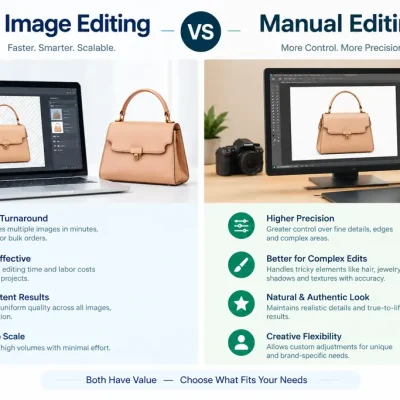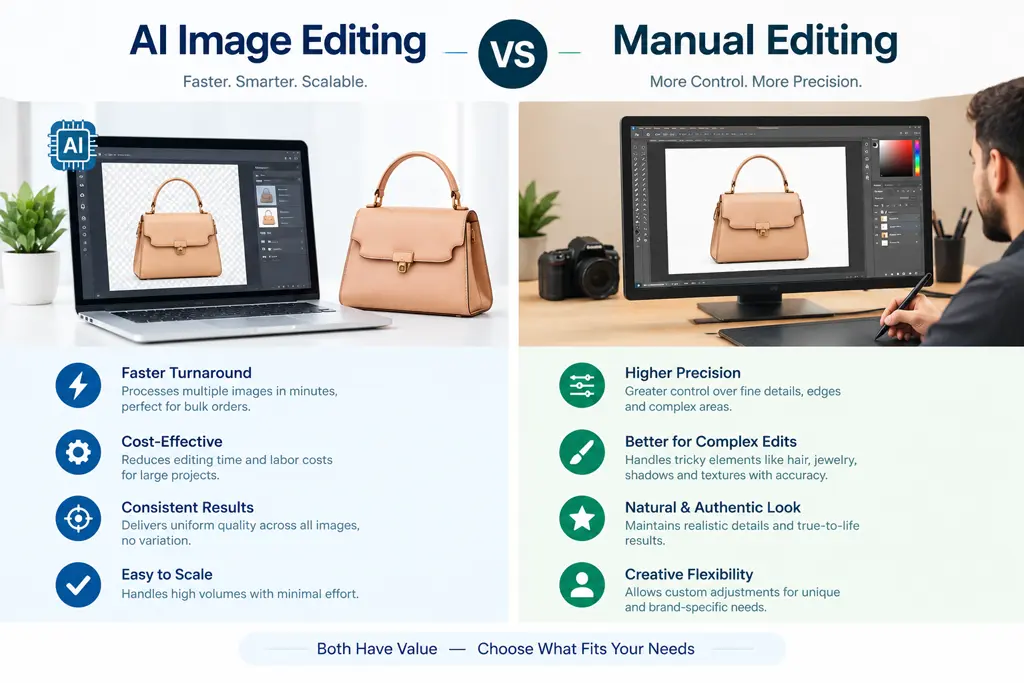
AI image editing is faster and cheaper for quick, low-stakes changes. Manual photo editing gives a human editor control over the small details — texture, reflections, logos, edges — that matter most in professional and ecommerce photography. If the image just needs to look good, AI is often enough. If it needs to look good and stay accurate to the real product, brand, or person, manual editing remains the safer choice.
Artificial intelligence has changed photo editing dramatically. Tasks that once required careful manual work — replacing a background, removing an object, enhancing a portrait — can now be done by AI tools in seconds. But faster does not always mean better for every project.
When an image represents a real product, a professional brand, a customer, a wedding, a property, or an advertising campaign, accuracy and control become just as important as speed. In this guide, we compare AI and manual photo editing, explain where each one wins, and show why manual retouching remains the stronger choice when precision, authenticity, and consistent quality matter most.
What Is AI Image Editing?
AI image editing uses artificial intelligence and machine-learning systems to analyze an image and automatically make changes based on commands, prompts, presets, or detected visual information.
Modern AI editing tools can perform tasks such as:
- removing or replacing backgrounds
- removing unwanted objects
- enhancing portraits
- changing clothing or environments
- improving lighting
- adjusting colors
- generating missing portions of an image
- enlarging or enhancing low-resolution images
- creating visual variations
The biggest advantage of AI editing is speed. A task that could take several minutes of careful manual work can sometimes be completed by AI within seconds.
However, AI does not examine an image the way an experienced professional retoucher does. Generative systems predict what an edited area should look like based on learned visual patterns. As a result, they may occasionally change details that the client wanted to preserve.
For casual images or creative experimentation, this may not matter. For professional commercial work, even a small unwanted change can be important.
What Is Manual Photo Editing?
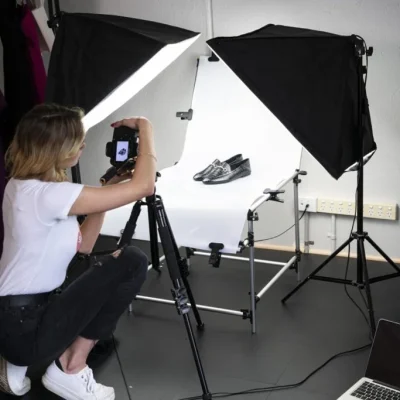
Manual photo editing is a human-controlled editing process in which a professional editor makes deliberate adjustments to an image using tools such as Adobe Photoshop, Lightroom, Capture One, or other professional editing software.
Although the software itself may contain automated features, the important decisions are made and reviewed by the editor.
Manual editing can include:
- clipping paths and multiple clipping paths
- precise image masking, including hair masking
- skin retouching
- dust and scratch removal
- color correction
- shadow and reflection editing
- jewelry retouching
- ghost mannequin editing
- object removal
- perspective correction
- complex compositing
- edge refinement
The main difference is control. Instead of asking software to generate what it believes should appear in an area, a skilled editor can inspect individual details and make adjustments according to the customer’s actual requirements.
This is why manual photo editing remains particularly valuable for high-end product photography, advertising, fashion, jewelry, real estate, and other precision-sensitive work.
AI Image Editing vs Manual Editing: The Key Differences
Both methods can produce impressive results, but they solve different problems.
Speed
AI is clearly stronger when speed is the priority. Automated tools can process common edits quickly and can be useful when a large number of images require similar basic adjustments.
Manual editing takes longer because a human checks and adjusts the image in greater detail. For customers who simply need a fast social-media graphic, AI may be more than sufficient. For a hero product image, campaign photograph, or important client project, spending additional time on precision is usually worth it.
Precision and Detail
Manual editing provides much greater control over small visual details. Consider a product photograph containing stitching, labels, logos, metallic reflections, fabric texture, packaging text, fine jewelry details, or transparent surfaces.
An AI system may produce a visually attractive result while unintentionally modifying one of these elements. A professional editor can instead isolate specific areas and work on them individually while preserving the original characteristics of the product.
Creative Control
AI editing is largely instruction-driven — you describe the desired result and the system determines how to produce it. Manual editing works differently: the editor controls precisely which part of the photograph changes, how much it changes, and which areas remain untouched. For projects with detailed client instructions, this level of control is valuable.
Accuracy
A beautiful image is not always an accurate one — a distinction that matters especially in ecommerce. If AI makes a fabric texture slightly smoother, changes the shape of a piece of jewelry, alters a label, or introduces a reflection that doesn’t exist on the real product, the result might look impressive while no longer representing the item accurately.
Manual editing allows the editor to enhance presentation while carefully protecting important product characteristics.
Natural Appearance
AI-generated changes can sometimes look convincing at first glance but reveal inconsistencies when examined closely — unnatural edges, inconsistent shadows, incorrect reflections, distorted patterns, unusual skin texture, or unrealistic background details.
Manual retouching gives an editor the opportunity to inspect these areas individually and correct them. The goal of high-quality professional retouching is often not to make an image look heavily edited — it’s to make the image look naturally polished.
Revisions
Client revisions are another major difference. A customer may say: “keep the product exactly the same but soften the shadow,” or “don’t change the logo,” or “make only the background pure white.”
With a manual workflow, an editor can return directly to the relevant layers, masks, or areas and make a controlled adjustment. With generative AI, requesting a new version can sometimes cause additional parts of an image to change as well. For projects involving multiple revision rounds, manual editing often provides a more predictable workflow.
At a Glance
| Feature | AI Image Editing | Manual Photo Editing |
|---|---|---|
| Speed | Very fast | Usually slower |
| Human control | Limited to the workflow/tool | High |
| Fine-detail editing | Can vary | Highly controllable |
| Product accuracy | Requires careful checking | Can be manually preserved |
| Creative control | Prompt or automation driven | Direct human control |
| Complex masking | Improving rapidly | Precise manual refinement possible |
| Revisions | May generate unexpected changes | Specific areas can be revised |
| Brand consistency | Requires monitoring | Can follow detailed brand standards |
| High-volume basic edits | Excellent | More time-intensive |
| Precision commercial work | Useful with human review | Often preferable |
Neither approach is universally better — the correct choice depends on what the image will be used for.
Why Customers Choose Manual Photo Editing for Professional Work
Manual photo editing remains valuable because professional images aren’t judged only by how attractive they look. They’re also judged by accuracy, consistency, realism, and whether they meet the client’s instructions.
1. The Original Product Can Be Preserved
For ecommerce photography, changing the appearance of a product too much creates a real problem. Manual editing allows an editor to improve exposure, remove distractions, clean edges, correct colors, and refine shadows while deliberately protecting details that must remain accurate — especially for apparel, jewelry, watches, shoes, furniture, cosmetics, electronics, accessories, and packaging.
Customers should see an attractive version of the real product, not a different product accidentally created during editing.
2. Every Image Can Receive Individual Attention
Not every photograph has the same problem. One image may have poor lighting, another dust, another a difficult reflection, another a need for careful hair masking or perspective correction. A manual editor can identify these differences and treat each photograph according to its actual needs rather than applying the same solution to every image.
3. Professional Retouching Can Remain Natural
Good retouching should enhance an image without destroying the qualities that make it look real. Portrait retouching is a good example — removing every pore and texture can create an artificial, plastic appearance. A skilled retoucher can instead reduce distracting imperfections while maintaining natural skin texture. The same principle applies to product photography: shadows, highlights, reflections, textures, and edges should be cleaned without making the product look artificial.
4. Difficult Edges Can Be Refined Manually
Hair, fur, transparent glass, lace, fabric fibers, jewelry chains, smoke, and reflective products can be hard to isolate cleanly. Automated masking technology has improved, but difficult images can still need manual refinement — a professional editor can zoom into complex areas and adjust masks, paths, or individual edges where necessary.
5. Brand Consistency Can Be Maintained
Businesses frequently need hundreds of images to follow the same visual standard: identical background colors, consistent margins, matching shadows, similar product positioning, consistent skin tones, accurate brand colors, standardized dimensions. Manual quality control helps ensure individual images follow the same specification — particularly important for ecommerce catalogs, marketplaces, fashion brands, agencies, and advertising campaigns.
When Is AI Photo Editing a Good Choice?
AI shouldn’t be treated as a bad technology — it’s extremely useful when applied to the right task. AI image editing can be an excellent choice for:
- rapid concepts
- social-media visuals
- idea generation
- rough mockups
- quick background experiments
- creative variations
- basic automated enhancement
- high-volume preliminary processing
- visual brainstorming
It can also help professional editors work more efficiently. The important question isn’t whether AI should ever be used — it’s how much precision and human control the final image requires. When minor variations are acceptable, AI can save considerable time. When every detail must match the client’s instructions, manual editing becomes much more valuable.
When Is Manual Editing the Better Choice?
Manual photo editing should be strongly considered when the image will be used for:
Ecommerce Product Photography — customers make purchasing decisions based on product photographs, so color, shape, material, logo, texture, and design details need to stay reliable.
Jewelry Retouching — jewelry involves highly complex reflections, small stones, metallic surfaces, and fine edges that frequently benefit from precise human retouching.
Fashion Photography — professional fashion retouching often involves careful skin work, fabric correction, shape preservation, color consistency, and detailed masking.
Professional Portraits — a skilled editor can reduce imperfections while retaining natural skin texture and the person’s identity.
Advertising Campaigns — campaign images may need to follow strict brand standards, dimensions, colors, layouts, and art direction.
Real Estate Photography — walls, windows, furniture, perspectives, lighting, and outdoor views need to remain visually believable.
Important Personal Photographs — wedding photographs, family portraits, memorial photographs, and restoration projects can contain details clients don’t want unexpectedly altered.
In these situations, controlled human editing provides additional assurance.
AI vs Manual Editing for Ecommerce Businesses
Ecommerce is one of the clearest examples of why this distinction matters. A product image has two jobs: attract the customer, and accurately represent what the customer will receive. An image can fail even if it looks beautiful.
For example, if an AI edit changes a button design, modifies stitching, adds an incorrect reflection, changes a shade of fabric, alters the shape of a product, or removes part of a logo, the image may still look professional — but it no longer accurately represents the original item.
Manual ecommerce retouching focuses on improving presentation without intentionally changing the product itself. Typical manual ecommerce services include:
- clipping paths and background removal
- ghost mannequin editing
- color correction
- shadow creation and reflection control
- product cleanup and dust removal
- jewelry retouching
- image resizing and marketplace-ready formatting
For businesses whose images directly influence purchasing decisions, this level of control is usually worth the additional editing time. (If you can share a real before/after example, a typical turnaround time, or the number of images you process for ecommerce clients each month, I can drop those specifics in here — that’s exactly the kind of detail that makes this section stand out from competitor articles.)
Does Manual Editing Mean AI Is Never Used?
Not necessarily. Professional workflows are increasingly hybrid. An experienced editor may use automation or AI-assisted tools to accelerate repetitive steps and then manually review and refine the final result — for example, letting AI handle an initial selection or cleanup while the editor handles critical edges, brand colors, product details, final retouching, and quality control.
The important distinction is that the customer isn’t simply receiving an unchecked automated output. A professional remains responsible for the final image, combining AI efficiency with human judgment.
Our Approach: Handmade Editing With Human Quality Control
For professional client work, we recommend a human-controlled editing process. Our priority isn’t simply to generate the fastest possible result — we focus on preserving important original details, following customer instructions, maintaining natural textures, creating clean edges, correcting colors carefully, keeping images visually consistent, checking the finished image before delivery, and making controlled revisions when required.
We call this handmade photo editing, because the final quality depends on professional human judgment rather than relying entirely on automatic generation. Technology can assist the process, but the editor remains responsible for the result. You can see examples of this work in our portfolio and learn more about our team.
AI Image Editing vs Manual Editing: Final Verdict
AI image editing and manual photo editing both have an important place in modern visual production. AI offers extraordinary speed and can be ideal for experimentation, concept creation, routine enhancements, and high-volume workflows. Manual editing offers something different: detailed human control.
When the photograph represents a real customer, a real product, an established brand, or an important professional project, that control becomes valuable. The goal isn’t to reject AI completely — it’s to choose the workflow according to the importance of accuracy.
If speed and experimentation are the main priorities, AI can be an excellent solution. If the final image requires precise details, reliable revisions, realistic retouching, brand consistency, and careful quality control, professional manual photo editing is often the safer choice.
AI can create impressive results quickly. A professional editor can decide exactly what should — and should not — be changed. For many professional projects, that human decision is what makes the difference.
Ready to see the difference on your own images? Request a free trial edit or get a quote for your next batch of product photos.
Frequently Asked Questions
Is AI image editing better than manual editing? It depends on the project. AI editing is often faster and more efficient for simple or repetitive tasks, while manual editing provides more direct control over specific details. For professional work where accuracy, complex retouching, or exact customer instructions matter, manual editing can be the better choice.
Can AI replace professional photo editors? AI can automate many editing tasks, but professional editors provide creative judgment, quality control, detailed corrections, and client-specific decisions. In many workflows, AI is best viewed as another editing tool rather than a complete replacement for professional expertise.
Why is manual photo editing more suitable for ecommerce products? Ecommerce photographs need to represent the real product accurately. Manual editing allows an editor to clean and enhance an image while carefully preserving product shape, color, texture, logos, labels, and other important characteristics.
Is handmade photo editing the same as manual editing? In this context, yes. Handmade photo editing refers to a human-controlled editing process where an editor personally reviews and adjusts the image instead of delivering a completely automated AI-generated result.
Does manual photo editing take longer? Usually, yes. Detailed manual retouching requires more time because the editor works on specific areas of an image and performs quality control. The additional time is often worthwhile when accuracy and professional presentation matter more than maximum speed.
Can AI and manual editing be used together? Yes. A hybrid workflow can be very effective. AI-assisted tools can accelerate repetitive steps while an experienced editor manually checks and refines important details before the image is delivered.